
T-Mobile Fiber: eero
eero LLCPersonalization
4.978.00 Reviews
- Version
- 26.9.1.200056
- Installs
- 50.00K
- Age Rating
- Everyone
Screenshots
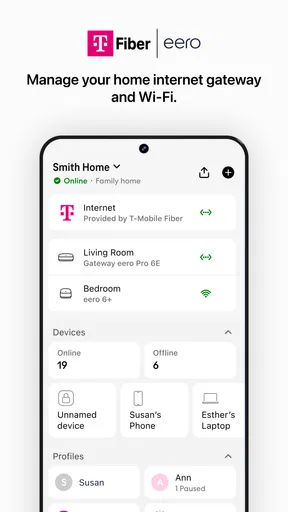
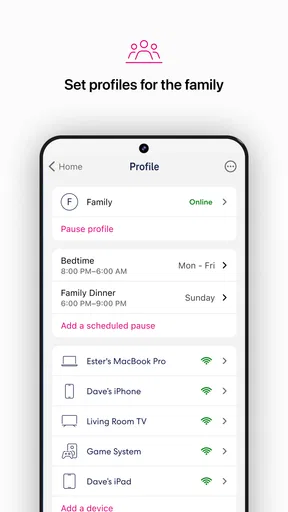
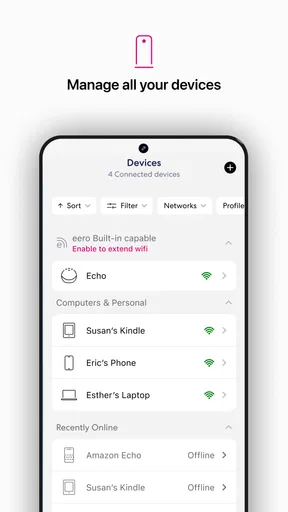
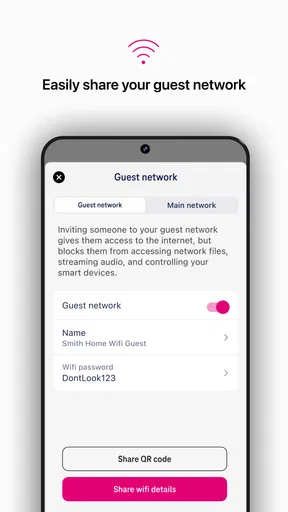
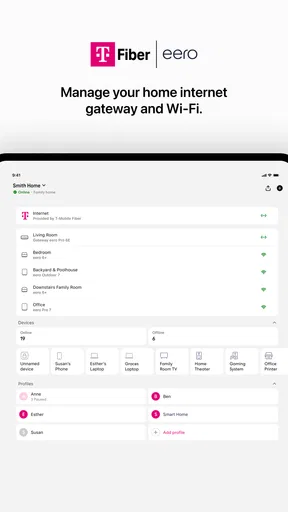
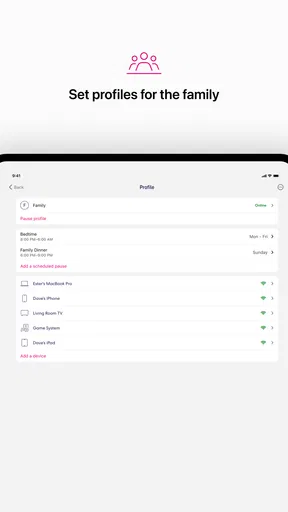
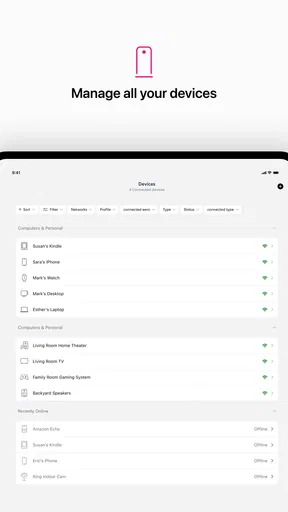
Our Review of T-Mobile Fiber: eero
 Analysis by Appyee
Managing home internet can feel unnecessarily complicated when the router, mesh units, and service provider all seem to live in separate worlds. T-Mobile Fiber: eero takes a more focused approach: it is a free personalization app from eero LLC for people using eero devices with T-Mobile Fiber internet service. I found its value less in being a general-purpose networking toolbox and more in giving one household a clear place to manage that particular setup.
That narrow purpose is important. This is not an app I would recommend simply because someone wants to experiment with Wi-Fi settings. It makes the most sense when T-Mobile Fiber is already your internet service and eero hardware is part of your home network. In that situation, the app can reduce the need to jump between unrelated tools and gives your connected equipment a dedicated control point.
The app is free and rated for Everyone, which makes it approachable for a shared household device. Its average rating is 4.9 from around 2.4 thousand ratings, and it has passed over 50 thousand installs. Those figures suggest a strong reception among the people who actually need this specific combination of service and hardware, although they should not be mistaken for proof that it suits every home network.
One focused job: managing an eero network on T-Mobile Fiber
I find the app’s narrow purpose useful because it gives a T-Mobile Fiber household a clear starting point for managing its eero network, rather than asking someone to guess which general router tool applies. That focus also makes it easier to decide whether the app belongs on your phone at all. The next section looks at how that choice fits into ordinary home-network routines.
Why the service-and-device connection matters
The central capability is straightforward: the app lets you manage eero devices connected to T-Mobile Fiber service. That sounds simple, but the practical benefit is avoiding a fragmented setup. When internet service and home networking equipment come from different places, it can be unclear which app should handle a problem or where a setting belongs. This app is designed around the relationship between the T-Mobile Fiber connection and eero equipment.
In my view, the strongest reason to use it is clarity rather than sheer feature count. A household member who did not install the network can open the relevant app instead of searching for a generic router utility. That matters when the person who normally handles technology is away, or when a visitor is helping troubleshoot a connection and needs to know which system they are dealing with.
The app sits in the Personalization category, but that label can undersell its practical role. I would think of it as a home-network management companion with a provider-specific focus. It is not trying to replace every networking tool on a phone. Its usefulness depends on whether your home matches its intended setup.
What I would check before installing
Before downloading it, I would answer two questions: do I use T-Mobile Fiber, and do I manage eero devices on that service? If either answer is no, the app is probably not the right choice. Installing it on a different internet connection just to explore its interface would not give you a meaningful reason to keep it.
The minimum operating-system requirement is version 9, so compatibility is broad for many Android users. The current version is 26.9.1.200056. I would still keep the phone and the app reasonably up to date, especially for a network-management tool, because the app needs to communicate with equipment that is central to your home connection.
Because it is rated for Everyone, the app is suitable for a household where more than one person may need access to basic network management. That does not mean every person should change settings casually. I would treat it like a shared utility: useful for checking the network and handling ordinary tasks, but worth using carefully when the change could affect everyone at home.
How it feels in an everyday home-network routine
In a household where people move between rooms and devices, the most helpful network habit is to identify the scope of a problem before changing anything. I’d use the app as a deliberate checkpoint: first work out whether the trouble is limited to one device or affects the home network more broadly. That approach makes its focused controls easier to use responsibly.
Starting with the network rather than the phone
The most sensible way to use this app is to begin with the physical setup. I would first make sure the eero devices are connected as intended to the T-Mobile Fiber service, then open the app to manage that network. This order matters because an app cannot compensate for a loose cable, an unpowered unit, or an eero device that has not been properly associated with the home system.
Once the setup is in place, the app becomes a reference point for the network. Instead of treating each eero unit as an isolated gadget, I would use the app as the place to understand the managed system as a whole. That is especially helpful in homes with more than one eero device, where it can otherwise be difficult to remember which unit serves the office, bedroom, or living area.
A useful habit is to open the app when the problem is still vague. If someone says, “the internet feels wrong,” I would check the managed network before making random changes on the phone or restarting every device in the house. That workflow can separate a home-network issue from a problem affecting only one laptop, television, or phone.
A realistic scenario: the room at the edge of the house
Imagine working from a back bedroom while another person streams video in the living room. The connection becomes unreliable, and the first instinct might be to blame the internet provider, the laptop, or the distance from the main router. With T-Mobile Fiber: eero, I would begin by checking the eero-managed setup rather than guessing.
The useful insight here is not that an app magically improves a weak signal. It does not replace good placement or solve every physical obstruction. Its value is that it gives the person responsible for the home network a dedicated way to inspect and manage the eero side of the arrangement. That can make the next decision more informed: check the affected area, verify the relevant device, or determine whether the issue is broader than one room.
If the rest of the home works normally while one room struggles, I would avoid immediately changing the entire network. A focused check is less disruptive than rebuilding settings that are working elsewhere. This is one of the app’s practical strengths: it encourages network management at the system level while still allowing you to think about where the problem actually occurs.
Helping a less technical family member
Another overlooked use case is handoff. In many homes, one person becomes the unofficial network administrator, even though everyone depends on the connection. A dedicated app with a clear relationship to T-Mobile Fiber and eero can make that responsibility easier to explain to someone else.
I would show a family member where the app lives, what network it represents, and which actions should be treated cautiously. That small preparation can save time later. If the usual administrator is traveling, another person has at least a recognizable starting point instead of opening several unrelated apps and hoping one of them controls the right equipment.
This is also where the app’s provider-specific identity helps. A generic router app may be flexible, but flexibility can create uncertainty. When the household knows that this is the T-Mobile Fiber and eero management app, the first troubleshooting step becomes more obvious.
Where the focused design helps, and where it creates friction
A focused management app can simplify the question of where to start, but convenience does not make every network issue an app issue. I’d distinguish between problems that call for checking the eero setup and those better addressed by examining a device or its physical surroundings. That trade-off helps clarify when this streamlined approach is useful—and when another tool or practical fix makes more sense.
The main trade-off is specialization
The same focus that makes the app useful for the intended setup limits its audience. If you use another internet provider, another mesh system, or a standard router without eero devices, this app is not a sensible alternative to your existing network tool. I would not choose it over a manufacturer’s app simply because it has a high rating; the hardware and service relationship comes first.
That specialization also means the app should not be judged like a universal Wi-Fi analyzer. Someone looking for broad diagnostics across unrelated networks may prefer a general networking utility. Someone who wants deep control over equipment from several brands may also find a provider-specific app too narrow. The right question is not whether it does everything, but whether it manages the setup you actually own.
Convenience can make mistakes feel more immediate
A management app puts network controls close at hand, which is convenient but also demands restraint. A change made from a phone can affect everyone connected at home. I would avoid experimenting during a work call, a remote class, or an important upload. If I needed to adjust something, I would choose a quiet moment and make one change at a time so I could tell what helped.
This is a non-obvious trade-off with any connected-home management tool: easier access is not the same as risk-free access. The app can simplify administration, but it does not remove the need to understand the consequence of a setting or to communicate with other people using the network. For a shared home, a little coordination is still worthwhile.
It cannot fix problems outside its role
I would also keep expectations realistic. A management app can be the right place to handle the eero portion of a T-Mobile Fiber network, but it cannot repair damaged household wiring, move a poorly positioned device, or make an incompatible phone behave correctly. If only one device has trouble, the cause may be that device rather than the network.
My troubleshooting order would be deliberately conservative. I would first identify whether the problem affects one device, one room, or the whole home. Then I would use the app to examine the managed network and its eero equipment. Only after that would I consider broader changes. This approach reduces the chance of turning a small issue into a full-house outage.
Privacy and access deserve ordinary caution
Because this is an app for managing home internet equipment, I would install it only from the official app marketplace and keep access to the phone protected. I would not hand an unlocked phone to someone merely because they want to “check the Wi-Fi.” The app’s Everyone age rating describes its general suitability, not a reason to ignore sensible account and device security.
I would also make sure the person using it understands which home network is being managed. In a building with several internet connections, a confusing setup can lead to troubleshooting the wrong equipment. A quick check of the service and eero devices before making changes is more valuable than repeatedly tapping through menus.
Who gets the most value from it
The best fit is someone whose home already uses both T-Mobile Fiber and eero equipment, especially if network questions sometimes fall to more than one household member. I’d think of it as a shared point of reference, not a universal Wi-Fi toolkit. With that distinction in mind, it’s easier to judge whether its focused role matches your needs.
A strong fit for a T-Mobile Fiber household with eero hardware
The clearest audience is a household that already relies on T-Mobile Fiber and eero devices and wants one dedicated place to manage that combination. For these users, the app’s specialization is an advantage. It keeps the network-management task connected to the service and equipment that matter, rather than asking the user to translate between generic router terminology and a specific home setup.
I can also see it helping people who are comfortable using a phone but do not want to become networking experts. The app does not make every home-internet problem disappear, but it gives them a logical starting point. That is valuable when the alternative is calling the most technical person in the family for every small question.
It is also a reasonable fit for households where network responsibility changes from person to person. A partner, roommate, or older child may occasionally need to check the home setup. Having a recognizable app tied to the correct service and hardware makes that handoff more practical than relying on one person’s memory.
Who should choose something else
I would skip it if your home does not use the T-Mobile Fiber and eero combination. A different eero setup may call for the app associated with that arrangement, while a non-eero network should be managed through its own provider or hardware tool. The most common mistake would be choosing this app based on the eero name alone without checking whether the service connection matches.
I would also look elsewhere if your priority is advanced, brand-neutral network analysis. This app is built around managing a particular household network, not around becoming a laboratory for every wireless device nearby. A broader utility may be better for someone who manages several brands, tests networks professionally, or wants tools unrelated to the T-Mobile Fiber and eero relationship.
Likewise, it is not the right answer for someone hoping an app will solve a physical coverage problem without changing the home setup. If a room is separated by thick walls or a device is placed poorly, the useful answer may involve placement, cabling, or hardware decisions. The app can support the management process, but it should not be treated as a substitute for those practical fixes.
My recommendation after using its focused approach
I like T-Mobile Fiber: eero because it knows what it is for. The app does not need to appeal to every Android user; it needs to be useful to people managing eero devices on T-Mobile Fiber. That focused role can make everyday troubleshooting less confusing, especially in homes where several people depend on the same connection but only one person normally handles the technical side.
The free price removes an obvious barrier, and the broad compatibility beginning with Android version 9 makes it accessible to many users. Its current version, 26.9.1.200056, shows that it is an actively identified release rather than an abandoned utility. I would still judge it by fit, not by the rating alone: a highly rated app for the wrong network is still the wrong download.
My practical advice is to install it when your T-Mobile Fiber service and eero hardware are already part of your home, then use it as the first organized stop when a network question appears. Start by identifying the scope of the problem, avoid changing several things at once, and remember that app-based management works best alongside sensible device placement and basic account security.
For the intended household, I would recommend it. Its real strength is turning a provider-and-mesh combination into one understandable management task. For everyone else, I would choose the app made for their actual internet service or router. That is not a weakness in this particular tool; it is the honest consequence of a design that stays focused on T-Mobile Fiber and eero rather than pretending to manage every kind of home network.
Verdict
Strengths of T-Mobile Fiber: eero
- Simple setup through the eero mobile app
- Reliable whole-home Wi‑Fi coverage with compatible eero units
- Automatic security updates help protect the network
- Easy device management, profiles, and parental controls
- Mesh expansion is available for larger homes or dead zones
Limitations of T-Mobile Fiber: eero
- Some advanced controls require an eero Plus subscription
- Compatible eero hardware may add extra cost
- Limited settings for users wanting detailed router customization
- Performance depends on home layout and connected device quality
- Service availability is restricted to select T-Mobile Fiber areas
Other Releases by eero LLC
View All
eero wifi system
Lifestyle4.8
Similar Picks in This Category
View All
Microsoft SwiftKey AI Keyboard
SwiftKey4.3

Wallpapers
Google LLC4.1

Zedge™ Wallpapers & Ringtones
Zedge4.7

Yandex Browser with Alice AI
Direct Cursus Computer Systems Trading LLC4.3

Ringtone Maker:create ringtone
Big Bang Inc.4.7

Fonts Keyboard
Fonts Keyboard3.9
Frequently Asked Questions
What is T-Mobile Fiber: eero, and what does it do?
T-Mobile Fiber: eero is the companion app for managing an eero mesh Wi‑Fi system provided with eligible T‑Mobile Fiber service. After signing in, you can set up eero routers, monitor your home network, view connected devices, create profiles, test connection performance, and adjust selected network settings. The exact features available may depend on your T‑Mobile Fiber plan, eero hardware, and account permissions.
Do I need T-Mobile Fiber and eero equipment to use this app?
Yes. This app is designed for customers who have compatible T‑Mobile Fiber service and an eero gateway or mesh router supplied or supported by T‑Mobile. It is not a general-purpose Wi‑Fi analyzer, and installing it alone will not provide internet access. Before downloading, confirm that your service address, eero equipment, and T‑Mobile account are eligible, since unsupported eero devices or other internet providers may not work with the app.
What can I manage from the T-Mobile Fiber: eero app?
The app lets you handle many everyday home-network tasks from your phone. Depending on your setup, you can complete installation, see the status of your eero network, identify connected phones and smart-home devices, pause internet access, organize devices into profiles, run speed tests, and manage guest Wi‑Fi. Some advanced controls, security options, or troubleshooting tools may require a compatible plan or updated eero firmware.
Is T-Mobile Fiber: eero free to download, and are there additional charges?
The app is generally available as a free download for supported Android and iOS devices, but downloading the application does not include internet service or eero hardware. You need an eligible T‑Mobile Fiber subscription, and any plan, equipment, installation, or optional service charges are handled through T‑Mobile rather than the app store. Review your service agreement for current pricing and included features before signing up.
What should I do if the app cannot find my eero network or devices?
First, check that your phone is connected to the correct Wi‑Fi network, Bluetooth and local-network permissions are enabled, and the eero units have power and stable status lights. Force-closing and reopening the app, updating it, and restarting the eero gateway can resolve temporary setup problems. If the issue continues, verify your T‑Mobile account credentials and contact T‑Mobile Fiber support, especially when equipment was recently replaced or moved.
